
Every tool in Shop Pilot.
One plan, every tool, for every shop you run. Here is what each one does.
Type a theme. Hundreds of designs come back.
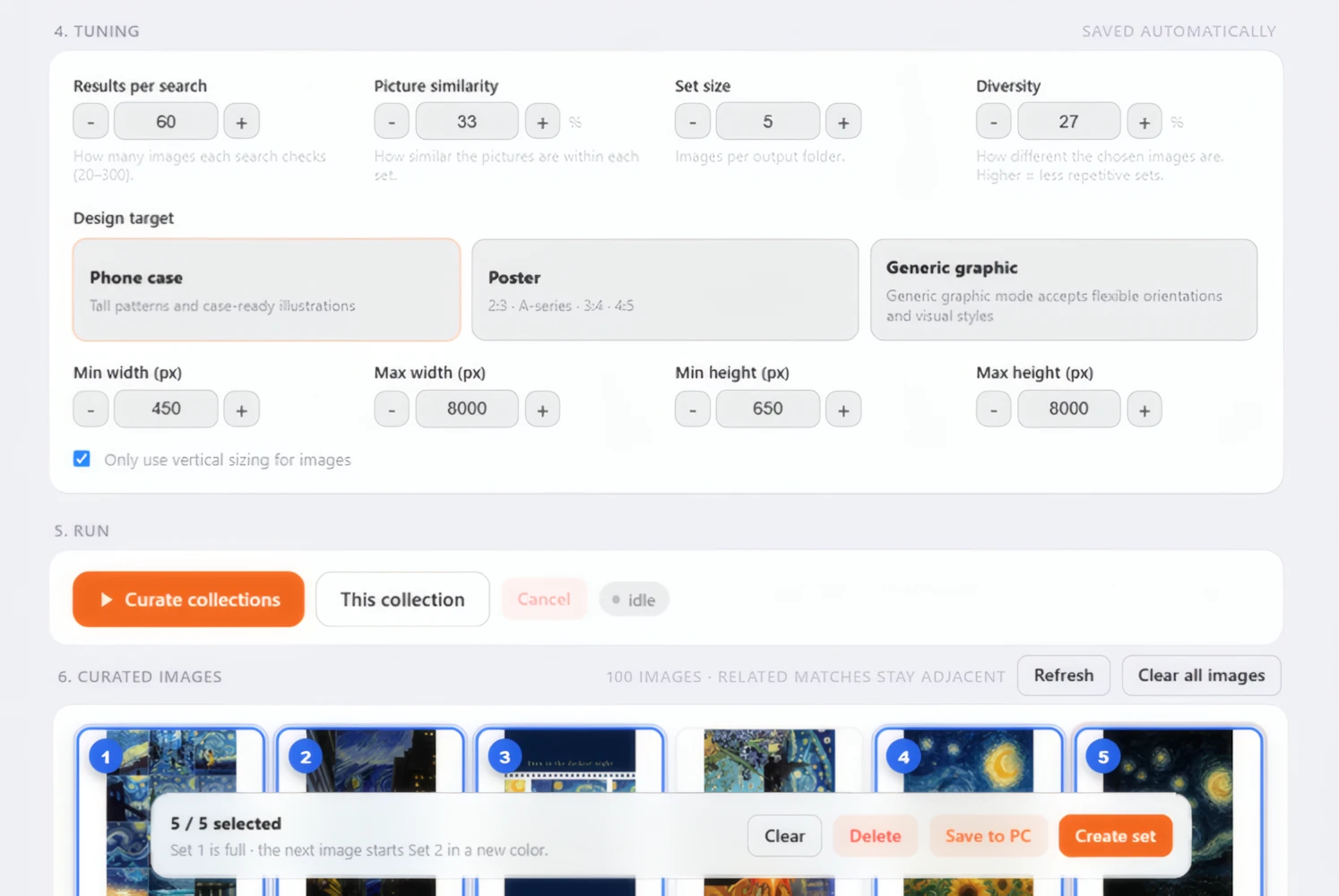
“Van Gogh art” is enough. Shop Pilot writes the searches itself, and you pick the designs you like, five for each phone case listing.
Curate
Describe a theme in one sentence, or type up to 10 searches of your own. Shop Pilot checks hundreds of results and keeps the designs that match.
See the design finderTrends and news
Ask for what is trending or in the news. Shop Pilot looks it up first, then writes the searches.
Collections
Keep each style in its own collection. Each one learns from the designs you pick, so its next results come closer to your taste.
Posters and more
Tell Curate what you are making: phone cases, posters in common print sizes, or any other graphic.
Sets of five
Click the designs you want, in order. For phone cases they fall into sets of five, and each set becomes one listing.
No watermarks
Designs with a visible watermark or @handle are left out for you.
Straight to listings
Send your sets on to mockups, drafts or live listings in one go.
Browser extension
Found a design on your own? Click it and it drops into a listing folder. Five picks fill a folder, then a new one starts.
Pick the designs. The mockups make themselves.
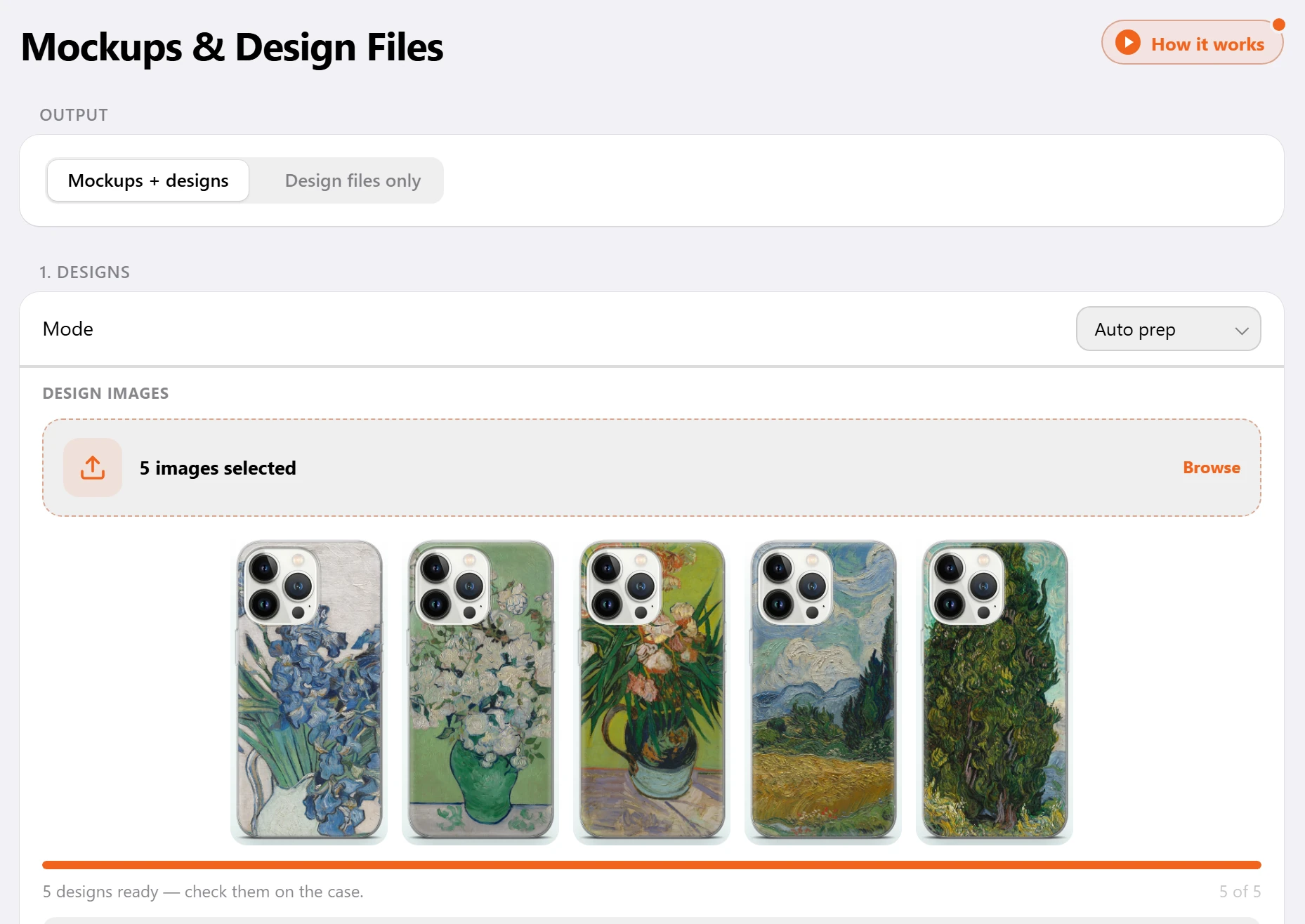
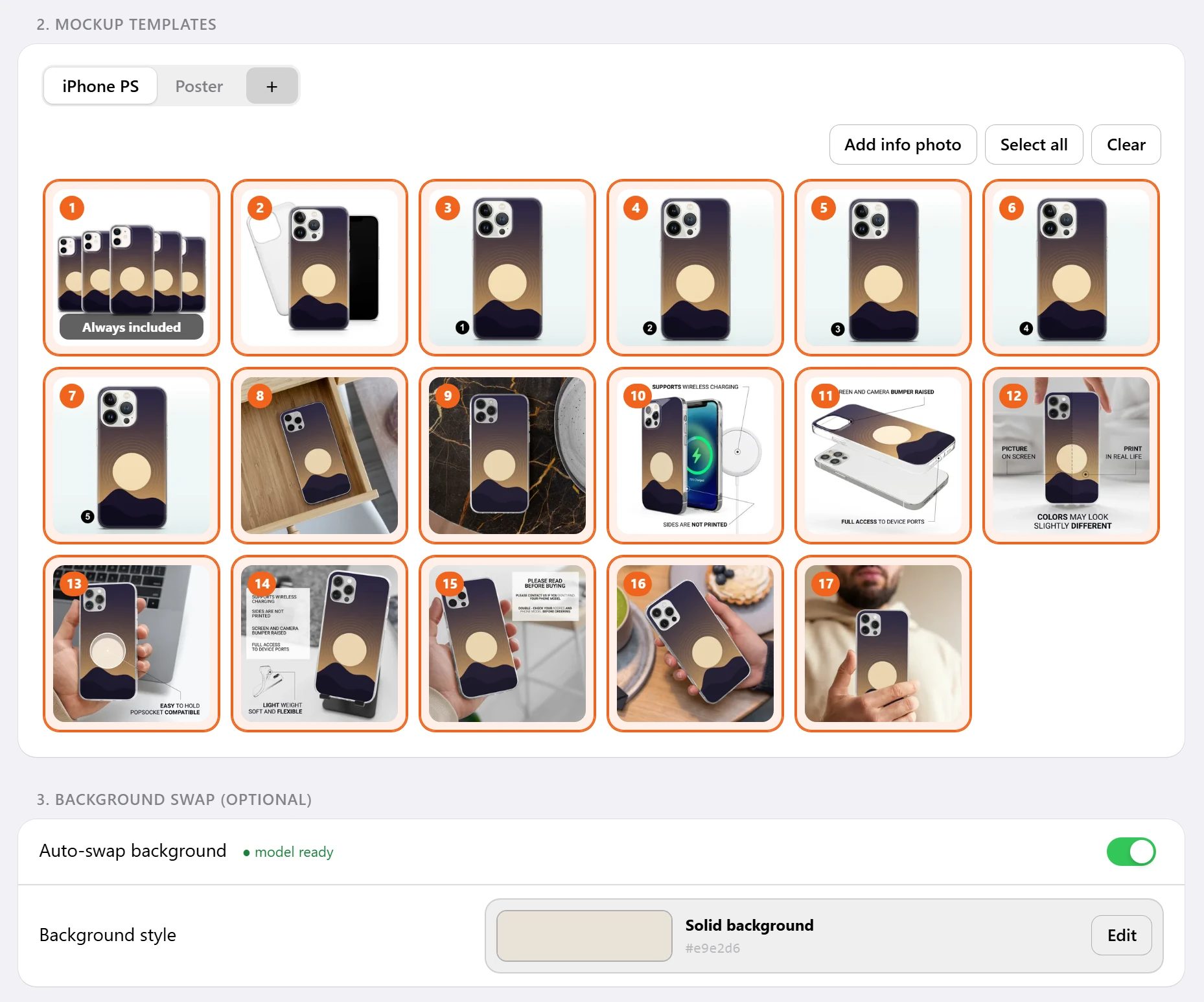
17 phone case mockups in about 7 seconds, in the photo order you set, saved in a listing folder on your computer. A poster gets one design, shown in room scenes.
Phone case mockups
17 mockups for every phone case listing. The first one shows all five designs together.
See all 17 phone case photosPoster mockups
One design per poster listing, shown in room scenes. Add your own templates too.
See the poster room scenesSmart mockups
Take a photo of your own blank product and mark where the design goes. Your designs land on it, matched to the corners and edges of your photo.
Smart and PSD mockupsAuto prep
Each design is fitted to the case for you, with the camera area kept clear of important art. You see the fit before the mockups are made.
Info photos
A size chart or a care card goes into every listing as it is, with no design on it.
Design files only
Need print files and no mockups? Shop Pilot can prepare the designs on their own.
Mockup Editor
Move or resize a design right in the dashboard, with layers, crop and AI upscale for small designs.
Every way to make mockupsBackground Changer
Put phone case mockups on a new background color, a few photos or whole folders at a time. Save each color as a preset.
The whole listing, written and filled in. About 37 seconds a listing.
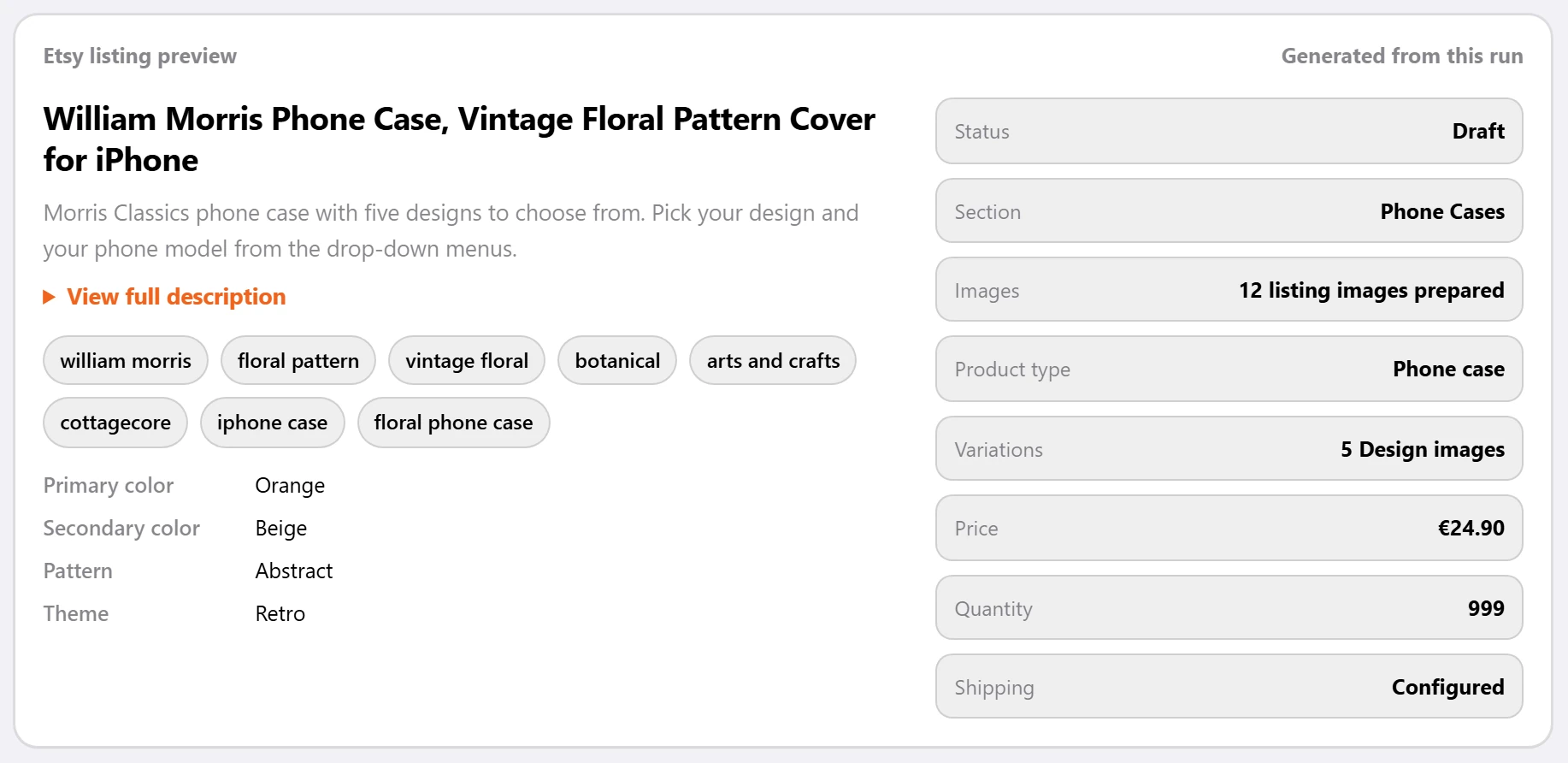
Pick the folders. Shop Pilot writes the title, 13 tags and description, and fills in prices, shipping and all 70 phone models from that shop's setup. Post live, or save drafts to check first.
Create Listings
Select your ready folders and press Create + Publish Live or Create Draft. Shop Pilot writes the copy, uploads the photos and fills in the listing.
See Etsy listing automationPreview Copy
Read the title, tags and description before anything goes to Etsy, and change them if you want.
Check Image Order
See which photo lands in which spot of the Etsy gallery before you list.
Review Drafts
Look through your drafts inside Shop Pilot, then publish or delete the ones you choose.
Listing Progress
Watch each listing go through its steps, then open it to check the photos and copy.
Listing Scheduler
Plan listings on a calendar. They go up on the days you pick, even with your computer off.
Schedule Etsy listingsNo double listings
Folders that are already listed are marked, so the same listing does not go up twice by mistake.
Stop any time
Stop halfway and the unfinished listing is taken off Etsy. The finished ones stay.
It still looks like your shop. Run ten shops and no two need to look alike.
Each shop keeps its own prices, shipping, photo order and writing style, and every new listing follows them.
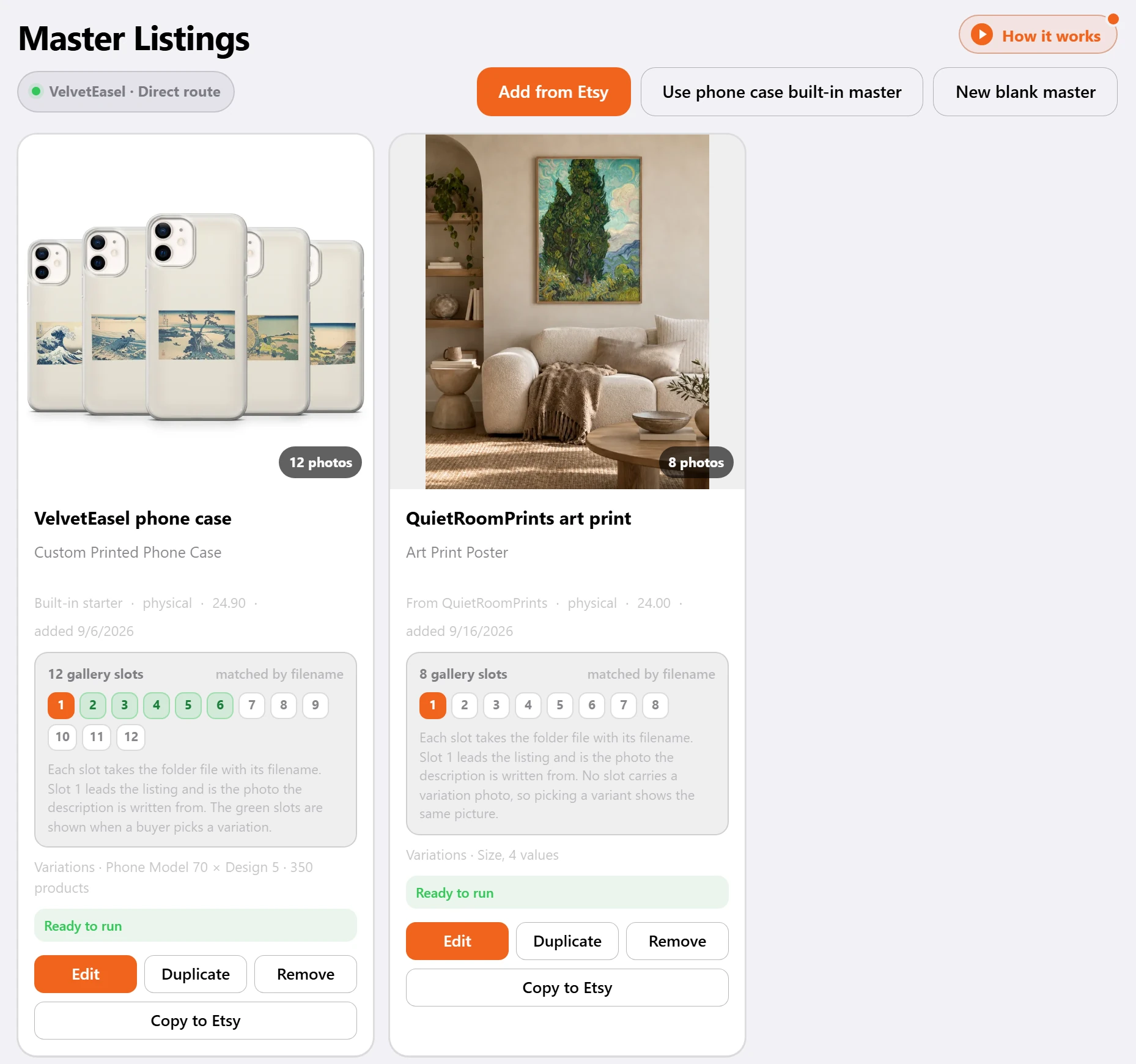
Master Listings
A master is the template every listing starts from: category, photos, variations, price and base copy. Copy one of your Etsy listings, or start blank.
See Etsy listing templatesBuilt-in phone case master
Ready to use, with Etsy's phone case category, 70 phone models with five designs each, and a personalization question.
Photo order
Give each gallery spot a photo once. Every listing puts the matching file in the same spot, so the right photo always leads.
Variations
Paste phone models in bulk and give each one its own price if you need to.
Personalization
Ask buyers for a name or a note, right on the listing.
Shop settings from Etsy
Pick the shop's shipping profile, return policy and processing profile once. Every listing uses them.
Writing style
Choose how titles are built, how many tags and hashtags to use, words to avoid and words to always include.
Niches
Phone cases, wall art or anything else. Each niche keeps its own folder, master listing and writing style.
One edit, every listing. You see the change before it saves.
Swap in a new phone model or replace a word in every title of a shop. Each change is shown before and after.
Bulk Edit
Sync a shop's live Etsy listings, search by title, tag or listing ID, and select as many as you need.
See Etsy bulk editTitles and descriptions
Find and replace a word, or give every selected listing the same text.
Tags
Add, remove or rename tags on many listings at once. Duplicates are skipped.
Phone models
Swap an old phone model for a new one on every listing that has it. Photos and prices stay as they are.
Prices
Raise or lower prices by a percent or an amount, or set one price for every variation.
Sections and more
Move listings to a shop section, set materials, turn auto-renew on or off, or deactivate them.
Before and after
Every change is shown listing by listing before it is saved. Big phone model edits start with a few listings you can check on Etsy.
Registry
Every listing Shop Pilot made, with its status and a link to it on Etsy.
Orders go straight to your supplier. Alerio for phone cases, Gelato for posters.
Each Etsy order comes in with the listing, phone model and design matched. Send it to your Alerio cart or your Gelato account in one click, and you pay the supplier directly.
Auto Orders
Your Etsy orders in one place, each with its listing, phone model and design. Search by order, buyer, SKU or phone model.
How Etsy order automation worksOrder board
Every open order sits in the step it is at: Needs you, Ready to send, at the supplier, or Shipped.
Alerio for phone cases
Phone case orders go into your Alerio cart in one click. You check out and pay in Alerio.
Gelato for posters
Poster orders go into your Gelato account, printed at the size the buyer picked. You pay in Gelato.
Check design
A poster design that does not fit its size waits for you. See it on the print sheet, then move it, scale it or swap the file.
No double orders
Every item is tracked on its own. An order that may already be in your cart is locked, so it is never sent twice.
Check demand before you make it. Then see how each shop is doing.
See demand and competition for any theme, and the Etsy listings behind the numbers. Every score is built from Etsy facts, not estimates.
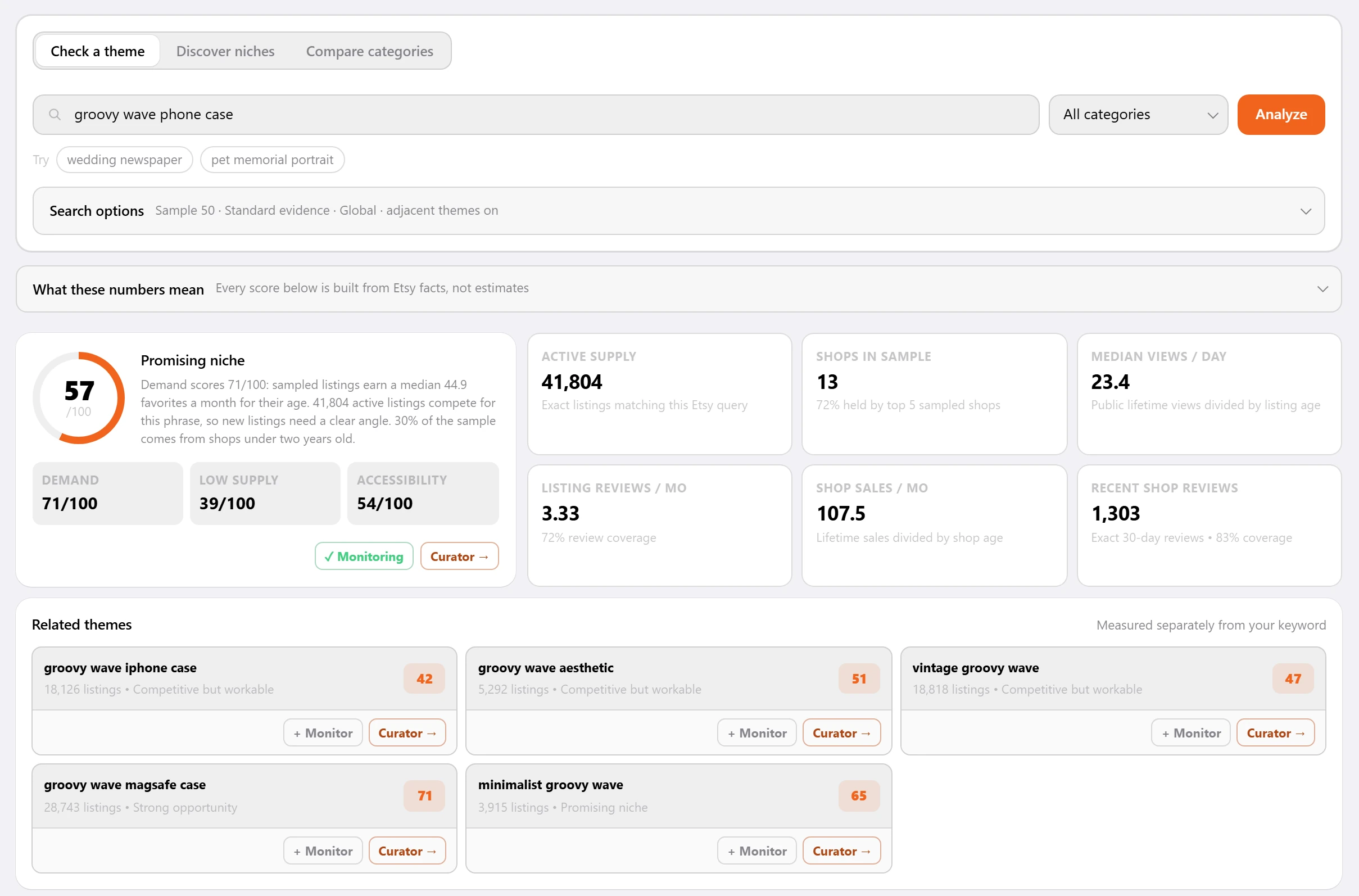
Check a theme
Type a theme and see its demand and competition, with the Etsy listings behind the numbers.
See Etsy market researchDiscover niches
No idea yet? Pick a category and Shop Pilot reads the themes that keep coming up among its best listings.
Compare categories
Score Etsy categories against each other before you pick where to sell.
Watch a theme
Save a theme and Shop Pilot checks it every day, so you see how its numbers move.
Send to Curate
Found a good theme? Send it straight to Curate as a search.
Analytics
Revenue, orders, views and favorites for each shop you run: today, the last 7 or 30 days, or all time.
One shop or a hundred. One dashboard.
Each shop keeps its own Etsy connection, settings and folders. Switch between them from the sidebar.
Every shop in one login
One shop or a hundred in one login, each with its own Etsy connection and settings.
Multiple Etsy shopsCopy a shop's setup
Starting a new shop? Copy the shipping, return and processing settings from a shop you already have.
Share or split
One master listing or writing style can serve many shops. Duplicate it when one shop needs a change.
Sections
Sort your shops and mockups into sections, like phone cases and wall art.
Guided setup
A step-by-step guide takes each new shop through its folder, its master listing and its Etsy settings.
One plan
Every tool, for every shop. The price per shop drops as you add shops, from €49.00 for one to €23.00 each at 100.
See pricing
You stay in control.
-
Etsy's own permission page
You connect each shop on Etsy's own permission page. Shop Pilot never sees your Etsy password.
What Shop Pilot can access -
Drafts when you want them
Check each listing before it goes live, or post live when you trust it.
-
Your setup, saved
Prices, photo order, writing style and Etsy settings are saved for each shop. You set them once.
-
Every step shown
You see each listing's steps as they happen. If a file or setting is missing, Shop Pilot says which one.
Can I check listings before they go live?
Yes. Choose Create Draft and each listing waits on Etsy as a draft until you publish it.
Can Shop Pilot post live by itself?
Yes. Press Create + Publish Live, or plan live posts in the Listing Scheduler.
Does it do the whole listing?
Yes. It makes the mockups, writes the title, description and tags, and fills in the shop section and Etsy's attributes.
Do I need Photoshop?
No. Mockups are made for you, and you can adjust any of them in the dashboard.
What happens after a sale?
The order shows up in Auto Orders. Send it to your Alerio cart or your Gelato account, with the listing, model and design matched.
Try the whole workflow free for 5 days.
No card. Connect your shop and have your first listings live today.