
Etsy mockup generator. Pick the designs. The mockups make themselves.
Phone case and poster mockups are built in, or use your own Photoshop files or a photo of your own blank product. Every listing's photos are made in seconds, numbered in your photo order and saved in a listing folder on your computer.
- About 7 sfor 17 phone case photos
- 4 waysto make mockups
- Photo orderset once
- No Photoshopneeded
Every listing's photos, made for you.
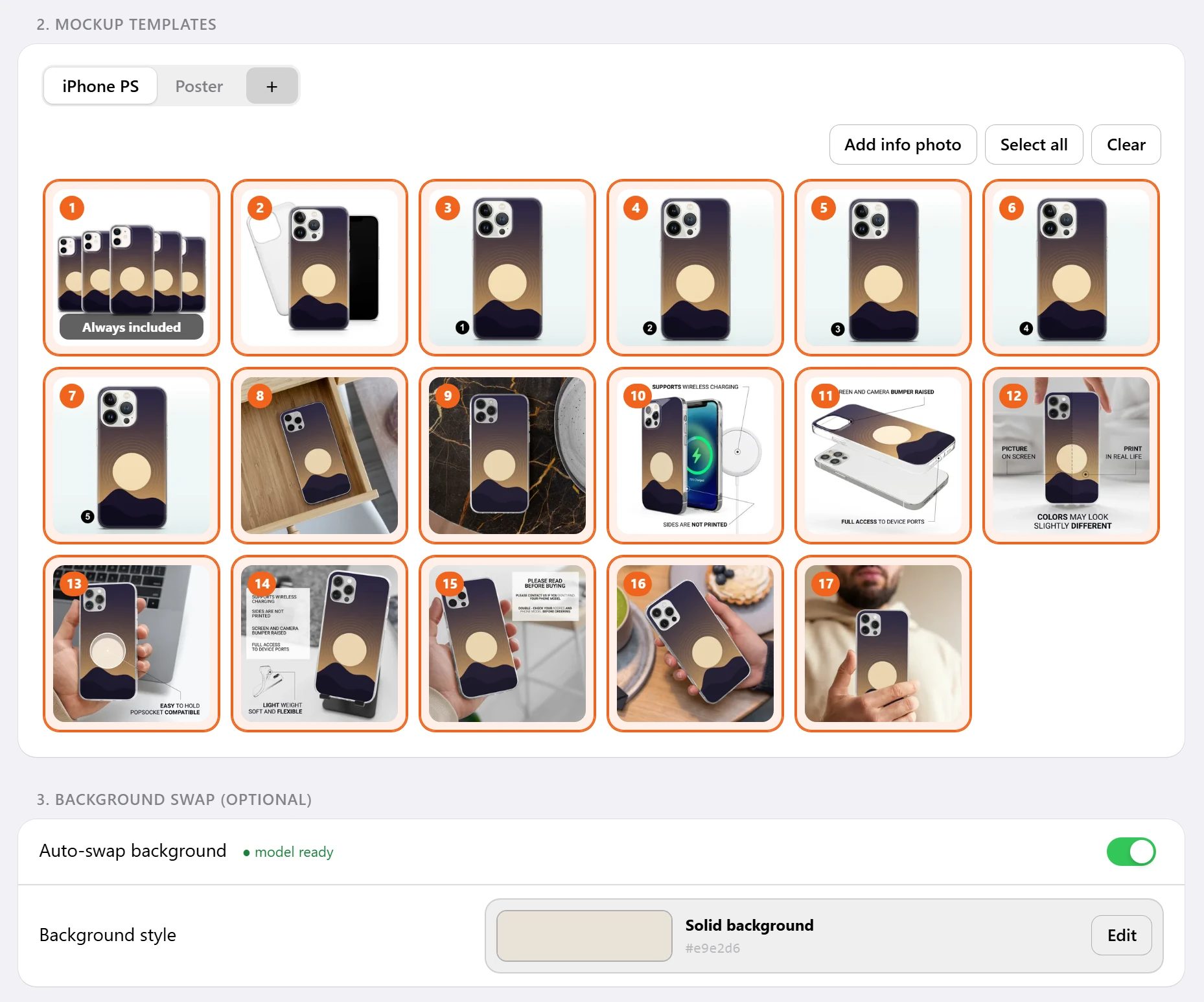
Shop Pilot is an Etsy mockup generator for print-on-demand sellers. Pick the designs, and the mockups make themselves: 17 phone case mockups in about 7 seconds, in the photo order you set, saved in a listing folder on your computer. A poster gets one design, shown in room scenes.
Phone case mockups render on Shop Pilot's own machines in a few seconds, with no upload to an outside mockup provider and no zip file to wait for.
Then the same folder becomes a listing: Shop Pilot's AI writes the title, 13 tags and description, and the listing goes up on Etsy. See Etsy listing automation.
Four ways to make mockups.
- Built in
Phone case mockups
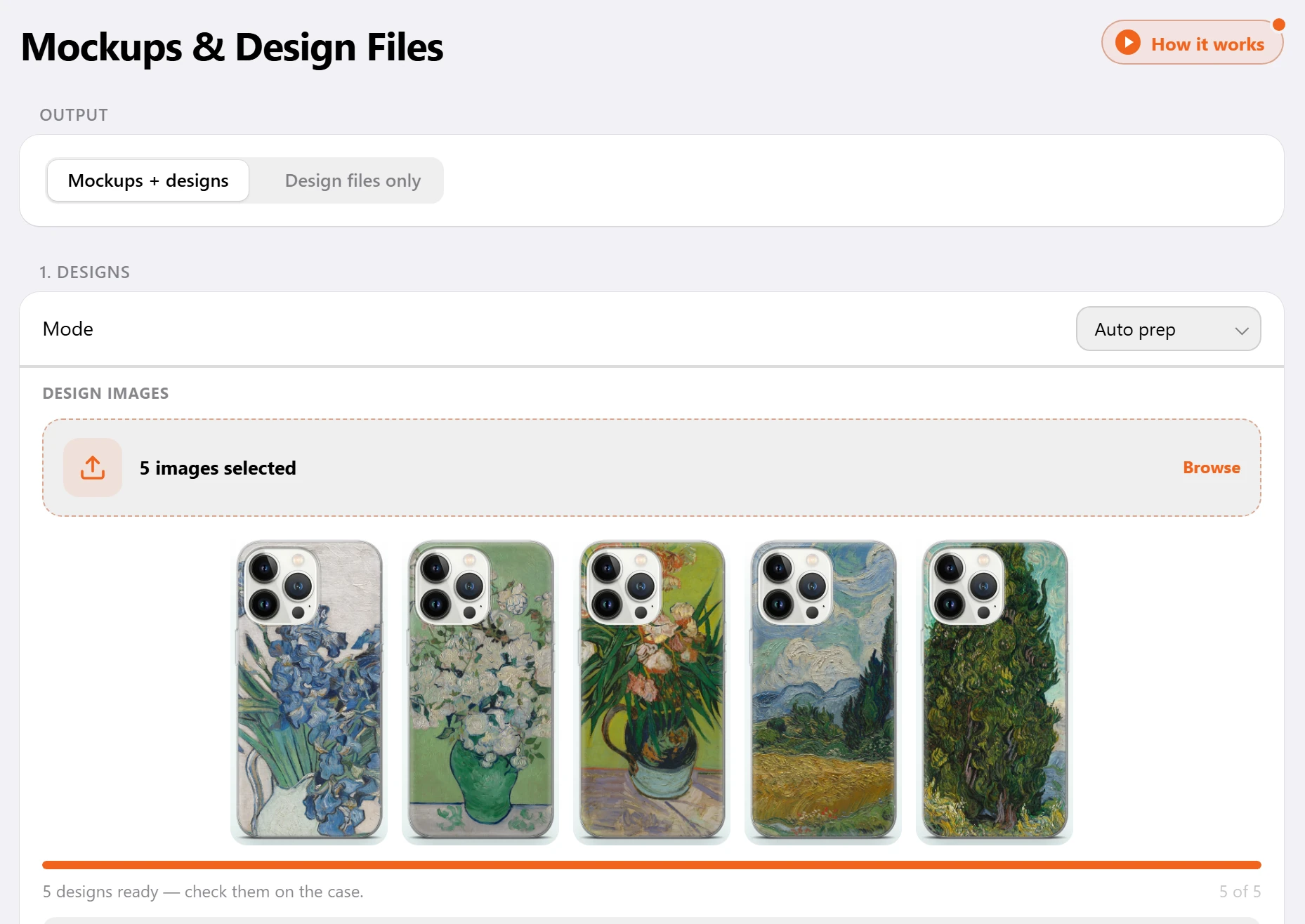
17 photos for every phone case listing, with all five designs together in the first one and the camera area kept clear.
Phone case mockups - Built in
Poster mockups
One design per poster listing, shown in the room scenes you pick, with every size you sell.
Poster mockups - Your files
PSD mockups
Your own Photoshop mockups. Shop Pilot finds the smart objects and puts every design in, keeping the bends, shadows and lighting.
PSD mockups - Your photo
Smart mockups
Take a photo of your own blank product and mark where the design goes. Your designs land on it, matched to the corners and edges of your photo.
Smart mockups
Five designs a set. Mockups in seconds.
Everything in the mockup step. No Photoshop needed.
Auto prep
Each design is fitted to the case for you, with the camera area kept clear of important art. You see the fit before the mockups are made.
Photo order
Give each gallery spot a photo once. Every listing puts the matching file in the same spot, so the right photo always leads.
Mockup Editor
Move or resize a design right in the dashboard, with layers, crop and AI upscale for small designs.
Background Changer
Put phone case mockups on a new background color, a few photos or whole folders at a time. Save each color as a preset.
Info photos
A size chart, a care card or a shipping note goes into every listing exactly as it is, with no design on it.
Design files only
Need print files and no mockups? Shop Pilot can prepare the designs on their own.
Sets of five
Click the designs you want, in order. For phone cases they fall into sets of five, and each set becomes one listing.
Your own poster templates
Add your own poster templates, and every design you run is placed in them too.
Pick the photos once. Every listing gets them.
From picked designs to finished photos.
Pick the designs
Find them with Curate, save them with the browser extension, or use your own files.
Choose the mockups
Built-in phone case or poster mockups, your own PSD files, or a smart mockup from a photo of your product.
The photos are made
Each design is fitted for you and every photo is made, numbered in your photo order, in the listing folder.
Check and adjust
Look the mockups over and fix any of them in the Mockup Editor before the listing goes up.
What changes when the mockups make themselves.
Shop Pilot is a print-on-demand mockup generator that also writes the Etsy listing and posts it.
| Task | By hand | With Shop Pilot |
|---|---|---|
| Placing designs | Open a template for each photo and line up every design | Each design is fitted for you |
| Photo order | Export, rename and sort the files | Numbered in your photo order, in the listing folder |
| Backgrounds | Recolor each mockup | A new background color for whole folders at a time, saved as a preset |
| Your own mockup files | Edit each PSD by hand for every design | Set up once, then every design goes in |
| Time per listing | Minutes, every listing | Seconds |
Before and after the mockups.
- Before
Design finder
One sentence in, hundreds of designs back, five per phone case listing.
Etsy design finder - After
Etsy listing automation
The AI writes the title, 13 tags and description; the rest comes from your setup.
Etsy listing automation - On the blog
How automated mockups work
Camera-safe placement for phone cases, background presets, and what happens to each design.
Read the article
How do I make mockups for Etsy listings?
Pick your designs in Shop Pilot and choose the mockups: the built-in phone case and poster mockups, your own PSD files, or a smart mockup from a photo of your blank product. Each listing's photos are made in seconds and saved in a listing folder in your photo order.
Do I need Photoshop?
No. Mockups are made for you, and you can adjust any of them in the dashboard's Mockup Editor.
How fast is it?
17 phone case mockups take about 7 seconds. PSD mockups are made in seconds once each file is set up.
Can I use my own mockups?
Yes. Add your own Photoshop (PSD) files or your own poster templates, or photograph your own blank product with smart mockups.
Can I change the background of my mockups?
Yes. The Background Changer puts phone case mockups on a new background color, a few photos or whole folders at a time. Save each color as a preset.
What are info photos?
A size chart, a care card or a shipping note that goes into every listing exactly as it is, with no design on it.
Can I make print files without mockups?
Yes. Need print files and no mockups? Shop Pilot can prepare the designs on their own.
Where do the mockups go?
Into a listing folder on your computer, numbered in your photo order. Shop Pilot can then write the listing and post it to Etsy, live or as a draft.
Can I fix a small design?
Yes. The Mockup Editor has AI upscale for small designs, plus layers and crop.
Can I try it free?
Yes. The 5-day free trial needs no card and includes 10 mockup folders a day.
Your next listing's photos, in seconds.
Five days free, no card. Connect your shop and have your first listings live today.